I owe you an apology in advance: this article barely mentions AI or LLMs. I know. A guide about websites, pages and search without putting AI in every paragraph. But I keep seeing publishers invest in excellent podcasts and leave almost all the value on someone else’s platform. That deserves some attention too.
Podcast SEO and owning your audience
Your team produced the interview. Why should someone searching for it find only a platform page? That visitor could be discovering your publication, reading related coverage or subscribing to your newsletter.
This guide explains how to give your podcast a searchable home on your own website while continuing to distribute it through the platforms your audience uses.
What is podcast SEO?
Podcast SEO is the work of making a podcast and its episodes easier to find in search engines and listening platforms. It includes episode titles and descriptions, useful website pages, transcripts, internal links and podcast feed metadata. The aim is to reach people searching for the topics and guests you cover, as well as those who already know your show.
Throughout this guide, I’ll use a fictional show called “The AI Visibility Podcast” to illustrate the page layouts and feed examples. The episodes, guests and URLs are made up too.
Structure your podcast website
Which pages should a podcast website have?
Start with a permanent page for each public episode and a show page with a browsable episode archive. Add season, topic and guest pages as the archive grows and they become useful to readers.
| Page type | When to create it | What belongs on it | Example URL |
|---|---|---|---|
| Podcast directory | A publisher or network has multiple shows | Show descriptions, artwork and links to each show | /podcasts/ |
| Show page | Every show | What it covers, hosts, where to start, episode archive, follow links and RSS | /podcasts/{show}/ |
| Episode page | Every public episode | Player, specific summary, show notes, transcript, guests and related episodes | /podcasts/{show}/{episode}/ |
| Season page | A season has a distinct story or needs its own browsing page | Season introduction, listening order and links to its episodes | /podcasts/{show}/seasons/{season}/ |
| Topic collection | The archive contains substantial coverage of a subject | An editorial introduction and selected episodes with explanations | /podcasts/topics/{topic}/ |
| Host or guest page | There is enough information and relevant work to justify a profile | Biography, expertise and links to appearances | /people/{name}/ |
| Clip page (optional) | A short excerpt answers a specific question and works on its own | Clip player, focused title, context and a link to the full episode | /podcasts/{show}/clips/{clip}/ |
| Adapted article (optional) | An interview supports a distinct written guide with additional explanation | An edited article, supporting sources and a link to the original episode | /articles/{topic}/ |
A full video episode uses the episode page as its watch page. A subscriber-only episode also uses an episode page, with a public description, any preview and subscription details. These are variants of the episode page; the clip and adapted-article rows are optional additions, discussed below.
For a single-show website, the homepage can serve as the show page. There is no benefit in building an empty directory that leads to the only show you publish.

The season page offers another route to an episode. It does not require another copy of that episode or another level in its URL.
I like to keep episode URLs independent of seasons so reorganizing the archive does not require moving them. The URLs in the table are examples: replace the placeholders and adapt them to your site. An existing season-based structure does not need a migration just to match the example.
If the podcast belongs to an existing publication, I would usually place it on that publication’s main site. That makes links from relevant articles and author profiles straightforward. A separate podcast brand may justify its own domain; the decision is about ownership, audience and maintenance, not a guaranteed ranking advantage from a particular URL arrangement.
Build a podcast show page that helps someone start listening
A show page needs to answer a visitor who has never heard of the podcast. Explain its subject, who hosts it and what kind of listening experience to expect. Include the cadence only if you can keep it accurate.
Place a short introduction above the archive. For an interview show, offer a few strong starting episodes with a sentence explaining each choice. For a documentary series, point to the beginning. A trailer can help a visitor judge the format without committing to a full episode.
Include follow links to the platforms you actually maintain and a clearly labeled RSS link. Each episode listing should link to its own page using its title, with a short description that distinguishes it from the surrounding episodes. Artwork and a play button alone make an archive hard to browse.
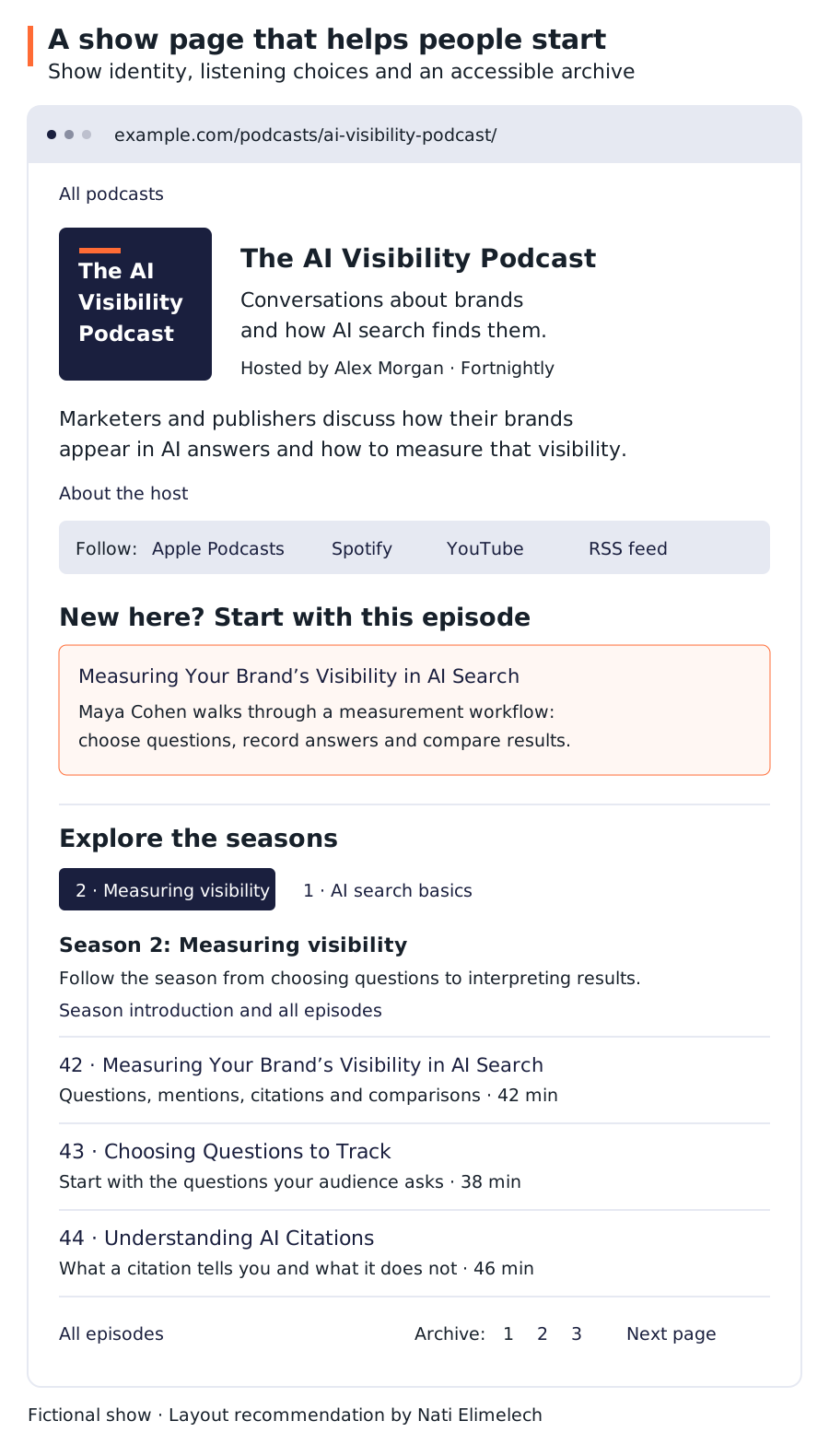
This fictional show-page layout gives a newcomer a starting point and returning listeners a browsable archive. The season shown has a listening order; an episodic interview show can list its latest releases first. Every episode title leads to its existing episode page.
Keep older episodes reachable from the show archive. A “Load more” interface should not leave the back catalogue without linked archive pages.
When a podcast season deserves its own page
A season page earns its place when it helps someone choose or follow a body of work. A six-part investigation can have a season introduction, the central question, a trailer and a clear sequence of episodes. A large interview archive can also benefit from season pages even if nobody searches for the season’s name.
For a small show where “season two” simply means recording resumed after a break, grouping episodes under a heading on the show page is usually enough. Avoid generating nearly empty season pages from a field in the publishing system.
A useful season page should describe the season itself. Keep full transcripts and episode-specific summaries on the individual episode pages. Link those pages back to the season and the show, and include previous/next episode links when listening order matters.
Include the back catalogue in the website sitemap even if the podcast feed contains only recent episodes.
Build useful podcast episode pages
What goes on a podcast episode page?
The episode page should work for someone arriving from a topic search, a guest’s website or a link in a message. They should not need to visit the show homepage to understand what they have found.
I would arrange it in this order:
- Episode title and context. Show name, publication date, duration, and season or episode number where useful.
- The player. Prominent near the top, with a direct listening alternative if the embed fails.
- A brief original summary. The subject, the guest and the specific question the conversation addresses.
- Takeaways and chapters. Enough detail to judge the episode and find relevant passages.
- Show notes and sources. Links to the research, tools, books and examples actually discussed.
- Guest information. A short relevant biography and an authoritative profile link.
- The transcript. Readable text, organized by speaker and useful headings.
- The next useful episode. Related listening, the season sequence or a route back to the show.
If the podcast has a full video version, I recommend making the episode page a dedicated watch page. Put a large player near the top, ahead of the summary, chapters and transcript, much like the viewing experience on YouTube. Watching the episode should be the page’s main purpose. Google: Video SEO Best Practices

This mockup uses a fictional episode to show the page layout. For an audio-only episode, use an audio player in the playback area. The transcript stays on the episode page in either format.
Write useful podcast show notes
Give the summary enough detail to explain what this episode covers. A short update needs less explanation than a technical interview.
“In this episode, we have an amazing conversation about AI” tells a visitor almost nothing. For the fictional measurement episode used in this guide, I would write a summary like this:
How do you measure whether your brand appears in AI answers? Maya Cohen explains how to choose questions to track, record mentions and citations, and compare results over time.
The notes below that summary should link to the sample tracking sheet and identify where each topic starts in the recording. Use descriptive chapter labels such as “Choosing questions to track” rather than “Part 2.” Add the real timestamps after checking the published audio.
Keep summaries faithful to the recording. A guest’s tentative suggestion should not become a proven result in the show notes.
Put the podcast transcript on the episode page by default
Publish the full transcript below the player, summary and show notes. Readers can search the conversation, check quotations and use it without audio. Offer a download as an additional option.
A third-party transcript service is fine; publish its text on your page
A third-party service can produce and store the transcript. Publish the approved text on your episode page so visitors can read it there, rather than having to follow an external link.
Implementation note: A collapsible transcript is fine. I recommend including its text in the page’s initial HTML and using the control only to show or hide it. This also serves crawlers and AI retrieval tools that do not execute JavaScript; Claude’s web fetch tool is one documented example. Claude: Web fetch tool
Make the podcast transcript worth reading
Correct speaker names, technical terms, numbers and punctuation. Preserve important qualifications: “might” and “will” are not interchangeable. Identify speakers consistently, add paragraph breaks and use timestamps that correspond to the published recording.
Where a meaningful sound affects understanding, describe it. For video, a spoken reference such as “look at this chart” may need a description of the chart to make the transcript useful. W3C: Transcripts
Separate the transcript from the edited summary. If you substantially rewrite the conversation into an article, label it as an article or edited adaptation. Readers should know whether a passage records what someone said or expresses the editor’s interpretation.
When an annotated podcast reading edition deserves another page
An annotated reading edition or a research archive can justify an additional page on your own site. Keep the standard transcript on the episode page, and link the two versions so readers can choose. Length alone is not a reason to move the transcript; headings and a collapsible section can make a long conversation easier to browse.
Where an AI agent can help with podcast SEO
For transcription, I recommend experimenting with Gemini 3.5 Transcribe. I found it did a pretty decent job in multiple languages, but try it on your own recordings. Your AI agent may already be able to transcribe audio through its available tools. Try a representative episode and check the result against the recording. Google: Introducing Gemini 3.5 Transcribe
Give the checked transcript to your agent and ask for a draft summary, show notes and a few title options. With timestamps, it can also suggest chapters and pull out resources mentioned in the conversation.
Give it access to your episode archive and it can suggest related episodes to link to. An agent with access to your pages and feed can check for missing transcripts or inconsistent metadata; browser access lets it test the players too.
Review the output before publishing, especially names, quotations and timestamps, and verify resource links. A summary should preserve what the guest actually said, including their uncertainty.
Should you use a third-party podcast embed?
Yes, when it gives listeners a reliable way to play the episode. You do not need to host media files on the same server as the website to build a useful episode page.
Keep the title, summary, notes and transcript in your own page. Treat an embedded player as the playback interface. Do not rely on text inside someone else’s iframe as a substitute for your episode content.
| Playback option | Practical benefit | What to check |
|---|---|---|
| Podcast host’s audio player | Playback can stay connected to the host’s media delivery and analytics | Keyboard controls, mobile playback, speed and direct listening fallback |
| Spotify or another app embed | Familiar interface for that platform’s audience | Logged-out behavior, device restrictions and what happens when the embed fails |
| YouTube or another video embed | Video playback without operating your own video infrastructure | Availability, captions, performance and Google’s video indexing criteria |
| Your own audio or video player | More control over the interface | Delivery reliability, accessibility, analytics and ongoing maintenance |
Choose one primary player and offer other listening options through secondary controls or links. Avoid loading several competing embeds for the same recording.
If consent is required before an external player loads, keep the summary and transcript available independently and assess the resulting video-discovery limitation.
Should podcast audio, video and clips have different URLs?
For the same full episode, I would normally use one page for video, audio, notes and the transcript. The episode page itself can be the watch page; it does not need a second URL just for video.
A short clip can deserve a page when it answers a specific question and is useful on its own. Name the clip for that passage, explain its context and link to the full episode. Avoid creating a page for every timestamp just because the publishing system can generate one.
The same editorial test applies to articles adapted from interviews. A focused guide with additional explanation can serve a different need from the episode. A second page that repeats the same summary under a keyword variation adds little.
Subscriber-only podcast episodes
If an episode is subscriber-only, decide what the public landing page will provide: an accurate description, a preview if available, and the subscription conditions. Do not expose private audio through a public feed or player while trying to make the page discoverable.
Distribute your podcast
Where should you distribute your podcast?
I would start with YouTube, Spotify and Apple Podcasts, then consider Amazon Music and iHeartRadio according to the audience and markets you serve. These are five major destinations, not a definitive worldwide ranking.
In Edison’s Q1 2026 US research, 37% of weekly podcast consumers aged 13 and over named YouTube as the service they used most, followed by Spotify at 21% and Apple Podcasts at 12%. Other services were grouped together, so this research does not establish fourth and fifth place. SSRS: The Podcast Consumer 2026, page 28
| Destination | How to distribute your podcast |
|---|---|
| YouTube / YouTube Music | Upload video episodes or import an audio RSS feed where available. YouTube instructions |
| Spotify | Submit or claim your existing show through Spotify for Creators or a supported host. Spotify instructions |
| Apple Podcasts | Submit the show’s RSS feed through Apple Podcasts Connect. Apple instructions |
| Amazon Music | Submit your RSS feed and confirm ownership. Amazon submission |
| iHeartRadio | Submit through its creator portal where eligible. Direct submissions are currently available from the US, Canada, Mexico, Australia and New Zealand, excluding Israel. iHeartRadio requirements |
Check which destinations your host handles and which need a separate submission. Hosting a podcast on one service does not automatically list it everywhere. Add other directories when they serve your audience, and keep your own show page and RSS link available. Spotify: Distributing your show to other platforms
Keep the show name, host identity and episode subject recognizable across destinations. Adjust descriptions for the interface instead of assuming a long website transcript should be copied into every field.
Podcast RSS feeds: what the website and listening apps need
If you work on SEO for publishers, you are probably familiar with RSS feeds that distribute articles and updates. Podcast feeds use the same RSS foundation, but carry additional information that listening apps need: show metadata, episode details and media enclosures that point to the audio files. A publisher’s standard article feed is not automatically a podcast feed. Check that your host or CMS generates a feed with the podcast fields required by your distribution platforms.
Keep the different addresses clear:
| Address | Example | Purpose |
|---|---|---|
| Show page | /podcasts/ai-visibility-podcast/ | Human-readable home for the show |
| Episode page | /podcasts/ai-visibility-podcast/measuring-ai-visibility/ | Human-readable home for one episode |
| Podcast feed | https://feeds.example.com/ai-visibility-podcast.xml | Subscription and episode distribution |
| Media file | https://media.example.com/ai-visibility-podcast-42.mp3 | The audio delivered to the player or app |
In RSS, the channel’s link points to the show’s website; an item’s link identifies its web page. The enclosure identifies the media, with a URL, length in bytes and MIME type. A webpage URL does not belong in the audio enclosure. RSS Advisory Board: RSS 2.0 Specification (Current)
What to verify in your podcast RSS feed
For Apple Podcasts, provide a public RSS 2.0 feed with the required tags, artwork and at least one episode. Keep episode enclosures unique and GUIDs stable. The host must support HTTP HEAD and byte-range requests so apps can inspect files and retrieve portions of the audio for playback. Apple Podcasts: Podcast RSS feed requirements
Have the host generate the platform-required show metadata, including title, description, language, artwork, category and explicit-content settings. For episodes, check the title, description, publication date, media URL, identity and relevant season fields in the generated XML, not just in the hosting dashboard.
A GUID is the episode’s persistent feed identifier. Keep it when correcting a title or moving a file. Set the item’s web link to your chosen episode page.
Validate the feed with each destination before submission.
Season pages and feed metadata do different jobs
The website’s season page helps people browse. The feed’s season fields help listening apps organize the show. Creating either one does not automatically create the other.
Apple distinguishes episodic shows, whose episodes can be heard independently, from serial shows intended for sequential listening. Set the show-level itunes:type appropriately, then supply episode and season metadata where applicable. Apple advises putting numbers in their metadata fields rather than repeating them in episode titles. A missing season number in a seasonal serial show can put an episode into an Unknown Season and affect automatic downloads. Apple Podcasts: How to set the order of podcast episodes
My default is one feed for the continuing show, with seasons represented inside it. Create a new feed when launching a separate show with its own subscription identity.
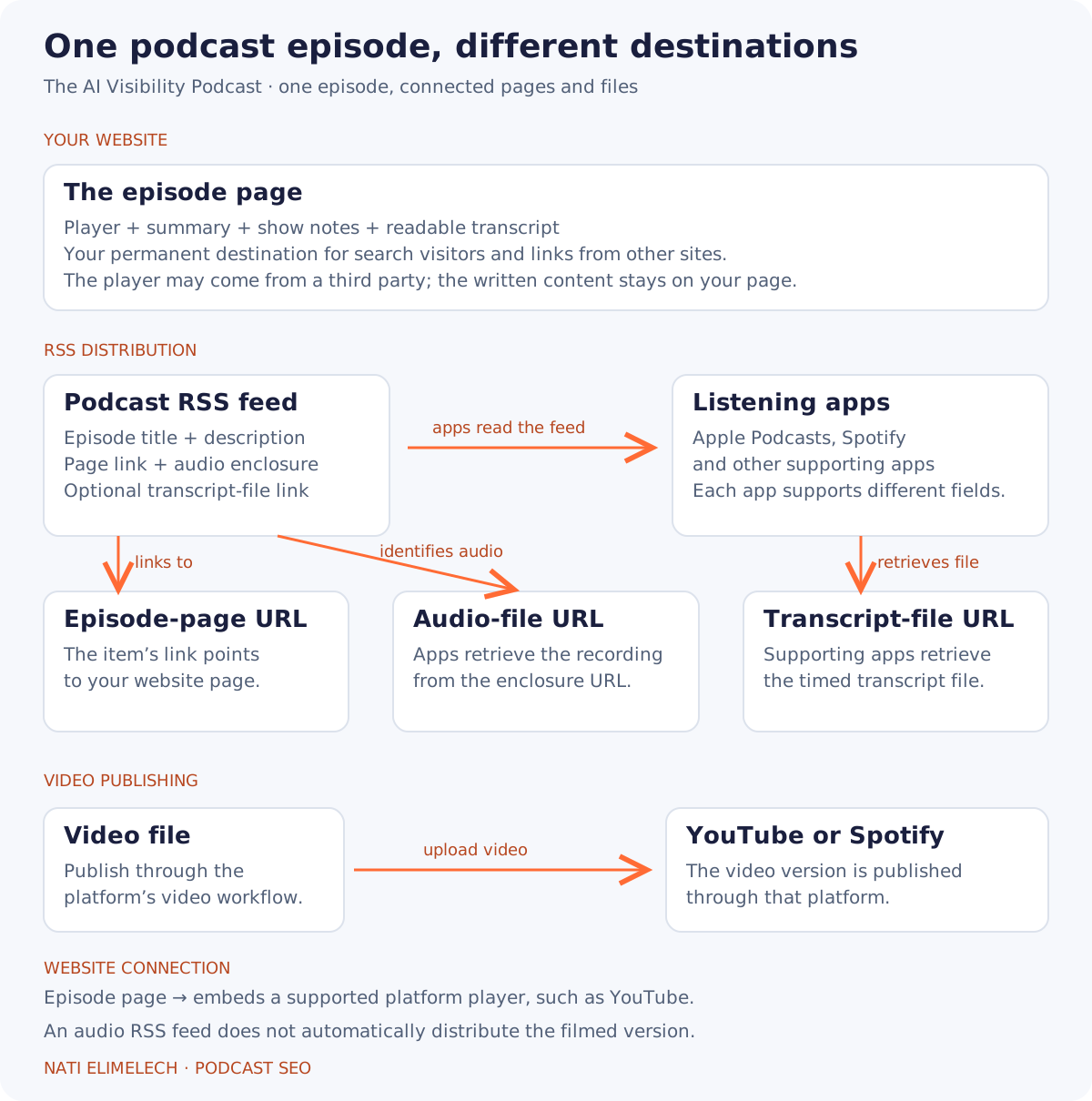
An audio feed does not automatically distribute the filmed version. YouTube’s RSS import creates videos using the show artwork; Spotify distributes its uploaded video through its own platform and audio through RSS. Transcript-file support varies by app. Spotify: Upload your video podcasts to Spotify
Example of a podcast episode item in an RSS feed
This illustrative XML item connects the episode page, audio file and transcript. It is an excerpt, not a complete submission-ready feed; the example addresses and file size must be replaced with real values.
<item
  xmlns:itunes="http://www.itunes.com/dtds/podcast-1.0.dtd"
  xmlns:podcast="https://podcastindex.org/namespace/1.0">
  <title>Measuring Your Brand’s Visibility in AI Search with Maya Cohen</title>
  <link>https://example.com/podcasts/ai-visibility-podcast/measuring-ai-visibility/</link>
  <guid isPermaLink="false">example.com:ai-visibility-podcast:42</guid>
  <pubDate>Tue, 08 Sep 2026 09:00:00 +0300</pubDate>
  <description>How to choose questions, track brand mentions and citations, and compare AI search results over time.</description>
  <enclosure
    url="https://media.example.com/ai-visibility-podcast-42.mp3"
    length="48000000"
    type="audio/mpeg" />
  <itunes:season>2</itunes:season>
  <itunes:episode>42</itunes:episode>
  <itunes:episodeType>full</itunes:episodeType>
  <podcast:transcript
    url="https://media.example.com/ai-visibility-podcast-42.vtt"
    type="text/vtt"
    language="en" />
</item>
The link sends a reader to the episode page. The enclosure supplies audio bytes to the player. The transcript tag identifies a separate timed-text file for supporting apps. None of these replaces the readable transcript on the website. The show-level itunes:type belongs on the feed’s channel, outside this episode item. Podcasting 2.0: Transcript
Help visitors and software find your podcast feed
I recommend a visible RSS link on each show page and a feed-discovery link in that page’s HTML head. On a multi-show directory, label each show’s feed so a visitor knows what they are subscribing to.
Use the actual feed address in the discovery link:
<link
  rel="alternate"
  type="application/rss+xml"
  title="The AI Visibility Podcast RSS feed"
  href="https://feeds.example.com/ai-visibility-podcast.xml"
/>
Distribute podcast transcripts to listening apps
Maintain a readable web transcript alongside any transcript you distribute to listening apps.
The Podcasting 2.0 podcast:transcript tag links an RSS episode to a transcript file and identifies its format. It can describe several formats; individual apps decide what they accept.
Apple supports supplied VTT or SRT transcripts and documents how to deliver them through the feed. Its supported-language list, checked in September 2026, does not include Hebrew. Apple recommends a link in the episode notes for unsupported languages. That is a reason to keep an accessible web transcript available when producing a Hebrew show. Apple Podcasts: Transcripts on Apple Podcasts
How to supply your own transcript to Apple Podcasts
For an RSS-based show, the transcript file and Apple’s display setting need to agree:
- Prepare an accurate VTT or SRT file for the published audio. Include speaker identification where supported; Apple documents speaker names in VTT.
- Use your host’s transcript feature to attach the file to the episode. Confirm that its URL appears in the episode’s RSS transcript tag, as illustrated in the RSS example above.
- In Apple Podcasts Connect, open the show’s Availability settings and select the option to display transcripts you provide. For an episode override, open Audio and Transcripts, select the media, choose Edit and set its transcript preference.
- After Apple refreshes the feed, check the episode’s transcript and any warnings in Connect. For an unsupported language, link to the readable web transcript from the episode notes. Apple’s transcript setup and correction instructions.
Make your podcast metadata useful in each listening platform
Apple Podcasts Search considers metadata, popularity and user behavior. Ratings and reviews can help a listener choose a show, but ratings, reviews and shares are not direct search-ranking factors in the app. Apple Podcasts: How Search works on Apple Podcasts
On Spotify, use clear titles, specific descriptions and useful links. Review transcripts, chapters, and guest and topic tags where those features are available for your episodes. Correct generated information before relying on it to introduce the conversation. Spotify: Words matter: How to get your podcast SEO right
For an audio-first podcast, use YouTube’s RSS import where available to create videos from the recording and show artwork. Check the episode selection to avoid duplicating existing uploads. If you replace the source audio later, use the re-upload process to update the YouTube video. Review the advertising and sponsorship rules before importing a monetized feed.
Link to the episode’s website page from platform descriptions where supported, especially for the transcript and resources. Use direct platform links when the purpose is to get someone listening in their preferred app. The destination should match the action you are asking them to take.
Make your podcast discoverable
Choose podcast episode topics and titles around real questions
Separate searches for the show from searches for the subject. Someone looking for a named podcast probably wants the show page. Someone looking for a specific interview wants the episode. Someone asking how to solve a problem may prefer a written answer, even if your recording contains an excellent discussion.
| Example search | Page to serve it |
|---|---|
| The AI Visibility Podcast | Show page with an introduction and episode archive |
| The AI Visibility Podcast Maya Cohen interview | The specific episode page |
| The AI Visibility Podcast episodes about AI search measurement | A curated topic collection, if the archive supports one |
| How to measure brand visibility in AI search | A written answer, on the episode page or in a separate article, that addresses the question |
Use listener questions and recurring subjects in your interviews to plan episodes. If a topic calls for a step-by-step answer, include that explanation in the episode’s written content; a conversation alone may not meet that need.
Use specific episode titles. For the fictional episode used throughout this guide, “Episode 42: A great conversation with Maya” gives a new visitor little reason to click. “Measuring Your Brand’s Visibility in AI Search with Maya Cohen” describes both the problem and the guest.
Connect your podcast archive with useful internal links
Add related episodes based on the actual conversation. An episode about measuring AI visibility can link to a discussion about choosing audience questions and another about interpreting citations. Explain the connection in the link text or surrounding sentence.
Link from relevant articles elsewhere on the site to the episode or passage that supports them. Give guests a direct episode URL they can reference from their own sites.
In each topic collection, explain what the selected episodes contribute and keep the selection current. Link guest profiles to their appearances in the archive.
Does podcast SEO help with AI search?
Identifiable speakers, a publication date, an accurate transcript and source links make an episode easier to reference in AI answers. Inclusion and citation remain up to the individual system.
Which structured data should a podcast site use?
| Page or content | Possible Schema.org type | Role |
|---|---|---|
| Show | PodcastSeries | Describes the continuing podcast |
| Season | PodcastSeason | Describes a season within the series |
| Episode | PodcastEpisode | Describes the episode and its relationships |
| Audio recording | AudioObject | Describes the audio media |
| Video recording | VideoObject | Describes the video; Google has documented video features |
Schema.org’s PodcastEpisode definition includes relationships such as partOfSeries, partOfSeason and associatedMedia. These can express the connection between an episode, its series and its recording. Schema.org: PodcastEpisode
Use PodcastEpisode and PodcastSeries to describe your content when they fit your publishing system. Neither currently has a dedicated Google rich result. Google: Structured Data Markup that Google Search Supports
A complete podcast episode JSON-LD example
This example connects our fictional episode to its show, season and audio file. Add the script to the episode page, replacing the example URLs and details with your own. If your show has no seasons, omit partOfSeason. Keep each @id consistent wherever you describe the same item.
<script type="application/ld+json">
{
  "@context": "https://schema.org",
  "@type": "PodcastEpisode",
  "@id": "https://example.com/podcasts/ai-visibility-podcast/measuring-ai-visibility/#episode",
  "url": "https://example.com/podcasts/ai-visibility-podcast/measuring-ai-visibility/",
  "name": "Measuring Your Brand’s Visibility in AI Search with Maya Cohen",
  "description": "Maya Cohen explains how to choose questions, record brand mentions and citations, and compare AI search results over time.",
  "datePublished": "2026-09-08",
  "episodeNumber": 42,
  "duration": "PT42M",
  "inLanguage": "en",
  "partOfSeries": {
    "@type": "PodcastSeries",
    "@id": "https://example.com/podcasts/ai-visibility-podcast/#series",
    "name": "The AI Visibility Podcast",
    "url": "https://example.com/podcasts/ai-visibility-podcast/"
  },
  "partOfSeason": {
    "@type": "PodcastSeason",
    "@id": "https://example.com/podcasts/ai-visibility-podcast/seasons/measuring-visibility/#season",
    "name": "Measuring visibility",
    "seasonNumber": 2,
    "url": "https://example.com/podcasts/ai-visibility-podcast/seasons/measuring-visibility/",
    "partOfSeries": {
      "@id": "https://example.com/podcasts/ai-visibility-podcast/#series"
    }
  },
  "associatedMedia": {
    "@type": "AudioObject",
    "@id": "https://example.com/podcasts/ai-visibility-podcast/measuring-ai-visibility/#audio",
    "name": "Measuring Your Brand’s Visibility in AI Search with Maya Cohen",
    "contentUrl": "https://media.example.com/measuring-ai-visibility.mp3",
    "encodingFormat": "audio/mpeg",
    "duration": "PT42M"
  }
}
</script>
When to use VideoObject for a video podcast
Include the required name, thumbnailUrl and uploadDate properties, then add a description, duration and video URL. Use contentUrl for the video file or embedUrl for the player when the file URL is unavailable. For a YouTube embed, use the player URL. The episode page’s address belongs in neither field. Google: Video (VideoObject, Clip, BroadcastEvent) Schema Markup
On September 24, 2026, Google added documented support for creator or author on VideoObject and expanded its interactionStatistic documentation. These are recommended properties, not required fields. For a video episode, identify the person or organization that created or published the video, with their name and a URL identifying them. An episode guest is not necessarily the video creator. Google: Latest Google Search Documentation Updates
Use interactionStatistic to describe actual video metrics through InteractionCounter, with the action in interactionType and its count in userInteractionCount:
WatchAction: views.LikeAction: likes.CommentAction: comments.ShareAction: reshares.
Include only available, current figures for that video. Omit a metric if you do not have a reliable count. View-count support predates this update; September’s documentation added the other interaction types.
For a video version on the same episode page, add this script alongside the episode markup. It connects the recording to the same episode through #episode. Replace the YouTube video ID, thumbnail URL and upload date with the actual video details. The mainEntityOfPage URL identifies your watch page.
<script type="application/ld+json">
{
  "@context": "https://schema.org",
  "@type": "VideoObject",
  "@id": "https://example.com/podcasts/ai-visibility-podcast/measuring-ai-visibility/#video",
  "name": "Measuring Your Brand’s Visibility in AI Search with Maya Cohen",
  "description": "Maya Cohen explains how to choose questions, record brand mentions and citations, and compare AI search results over time.",
  "thumbnailUrl": [
    "https://example.com/images/measuring-ai-visibility.jpg"
  ],
  "uploadDate": "2026-09-08T09:00:00+03:00",
  "duration": "PT42M",
  "embedUrl": "https://www.youtube.com/embed/REPLACE_WITH_VIDEO_ID",
  "mainEntityOfPage": "https://example.com/podcasts/ai-visibility-podcast/measuring-ai-visibility/",
  "encodesCreativeWork": {
    "@type": "PodcastEpisode",
    "@id": "https://example.com/podcasts/ai-visibility-podcast/measuring-ai-visibility/#episode",
    "name": "Measuring Your Brand’s Visibility in AI Search with Maya Cohen",
    "url": "https://example.com/podcasts/ai-visibility-podcast/measuring-ai-visibility/"
  }
}
</script>
Both examples use fictional URLs and pass the Schema Markup Validator. Replace the sample details with those of your episode. Schema.org: Schema Markup Validator
For a YouTube-hosted episode, add timestamps and descriptive labels to the YouTube description, one per line in chronological order. These can inform key moments in search.
On your own watch page, use Clip to specify selected segments or SeekToAction to describe a timestamp URL pattern so Google can identify them. A URL such as /podcasts/ai-visibility-podcast/measuring-ai-visibility/?t=875 must actually open the player at 14:35; adding a query parameter alone does not implement seeking. Test the link in a new tab.
SeekToAction also requires access to the video file and currently does not support Hebrew. Clip and YouTube description timestamps support all Google Search languages.
Measure and maintain your podcast archive
How to measure podcast SEO
Measure the website and the listening platforms separately, then look for connections you can support with data.
| Question | What I would measure |
|---|---|
| Are episodes being found in Google? | Episode-page impressions and clicks, queries, indexing status |
| Is discovery expanding beyond the show name? | Topic and guest queries compared with branded queries |
| Is video contributing? | Video search performance and video indexing, separately from ordinary web results |
| Do visitors try the recording? | Player starts where measurable, plus outbound listening clicks |
| Do people keep listening? | The host’s or platform’s available consumption and retention metrics |
| Does the audience take the intended next step? | Newsletter subscriptions, inquiries or another defined outcome |
An outbound click is not a completed listen. A media download is not necessarily a person who heard the whole episode. Report each metric under its actual definition, and identify where an embedded player or app prevents end-to-end attribution.
Before improving an archive, save a baseline for the pages you will change. Record which titles, summaries, transcripts and links changed, then compare like periods and account for new releases and guest promotion. A traffic spike after a popular guest shares the episode cannot be assigned entirely to the new transcript.
If visits grow but listening does not, check whether people are getting what they need from the transcript. Reading an episode can be a useful outcome too.
Preserve your podcast archive when the show changes
Keep useful old episode pages available when a season ends or publishing stops. Add context if the show is complete or the advice has become outdated.
When changing hosting providers, handle the website and the feed as separate migrations. Map old episode URLs to their matching replacements, preserve the media relationships and test playback before canceling the old service.
When moving a self-hosted feed, set up a 301 redirect and use itunes:new-feed-url for Apple Podcasts. Keep the redirect and migration tag in place for at least four weeks. Preserve episode GUIDs and verify that existing subscriptions receive new episodes before retiring the old hosting setup. Apple Podcasts: Change the RSS feed URL
When a recording is removed but the notes still provide value, explain the unavailability on the episode page.
Where I would start with an existing podcast archive
For an existing archive, first fix episodes with no usable page or no link from the show archive. Then improve the pages people already find and the recordings that still answer useful questions.