This guide covers OpenAI’s bots: what each one does on your site, how to identify and verify its requests, how to block it, and what blocking it changes for search, for training and for pages that ChatGPT reads on a user’s behalf.
OpenAI’s bots and what each one does
| Bot or tool | Role | When it arrives |
|---|---|---|
| GPTBot | Collects content that may be used for training | Automatic crawling |
| OAI-SearchBot | Crawls for ChatGPT search | Automatic crawling |
| ChatGPT-User | Fetches a page after a user action | While someone uses ChatGPT |
| OAI-AdsBot | Checks ad landing pages | After an ad is submitted to ChatGPT |
| ChatGPT Work cloud browser | Browses on the user’s behalf | While it carries out a task |
OpenAI separates its crawlers by purpose, so blocking one of them does not necessarily block the others. The robots.txt file holds crawling instructions for bots, and the blocking examples below apply to the whole site wherever a bot supports that kind of block. OpenAI: Overview of OpenAI Crawlers What is robots.txt? robots.txt is a text file that says which URLs crawlers may fetch. robots.txt controls crawling, not indexing. Full definition of robots.txt
User-Agent is the request header in which software names itself. Anyone can fake it, so finding a bot’s name in your access log does not prove that the request came from OpenAI. To check where it came from, verify the request against OpenAI’s IP ranges, as described further down.
Your robots.txt may already contain rules that block a bot or allow it into part of the site. Before you add any of the examples, check which rules already apply to that bot, as explained in the robots.txt section below.
GPTBot
What GPTBot does
GPTBot collects public web content that may be used to train OpenAI’s future models. It crawls automatically, without a user having asked for the page.
A GPTBot request in your logs does not prove that the content was trained on or will be cited in ChatGPT. The log records an access attempt, and next to it you can check what your server returned.
How to identify GPTBot
To find requests that present themselves as GPTBot, search the User-Agent field of your server logs for GPTBot. This is an example of the header the bot sends:
User-Agent: Mozilla/5.0 AppleWebKit/537.36 (KHTML, like Gecko); compatible; GPTBot/1.4; +https://openai.com/gptbotWhen GPTBot requests robots.txt itself, it may add a robots.txt marker to its User-Agent string. OpenAI shows the marker in its OAI-SearchBot example, and following the same structure, a GPTBot request for the file would look like this:
User-Agent: Mozilla/5.0 AppleWebKit/537.36 (KHTML, like Gecko); compatible; GPTBot/1.4; robots.txt; +https://openai.com/gptbotWhat happens when you block GPTBot
Blocking GPTBot tells OpenAI that the blocked content should not be used to train its models. It does not block OAI-SearchBot or ChatGPT-User, and it does not guarantee the removal of content that was collected before.
How to block GPTBot
To block GPTBot across the whole site, add these lines to your robots.txt:
User-agent: GPTBot
Disallow: /
OAI-SearchBot
What OAI-SearchBot does
OAI-SearchBot crawls content for ChatGPT search. Its permission is separate from GPTBot’s, so a site can stay available to search while limiting collection for training.
When both bots are allowed, OpenAI may use the results of a single crawl for both search and training. So the absence of GPTBot requests in your logs does not mean the content was not used for training. To limit training, block GPTBot explicitly.
How to identify OAI-SearchBot
To find requests that present themselves as OAI-SearchBot, search the User-Agent field of your server logs for OAI-SearchBot. This is an example of the header the bot sends:
User-Agent: Mozilla/5.0 (Macintosh; Intel Mac OS X 10_15_7) AppleWebKit/537.36 (KHTML, like Gecko) Chrome/131.0.0.0 Safari/537.36; compatible; OAI-SearchBot/1.4; +https://openai.com/searchbotOAI-SearchBot may also add the robots.txt marker to its User-Agent string when it requests the file, the same as GPTBot.
What happens when you block OAI-SearchBot
If you block OAI-SearchBot, your site will not be shown in ChatGPT search answers, but it can still appear as a navigational link. Blocking it does not limit GPTBot and does not, by itself, stop pages from being fetched on a user’s request.
How to block OAI-SearchBot
To block OAI-SearchBot across the whole site, add these lines to your robots.txt:
User-agent: OAI-SearchBot
Disallow: /
It can take about 24 hours for a change to OAI-SearchBot’s rules to take effect in OpenAI’s systems. An allow rule in the file does not help if your server or CDN actually blocks the requests.
How Cloudflare helps OpenAI’s search crawler discover pages
On October 15, 2026, Cloudflare and OpenAI reported the results of a pilot in which signals from Cloudflare’s network helped OpenAI’s search crawler find new URLs and decide which pages are worth revisiting. According to the two companies, the pilot used about 1% of Cloudflare’s network and led OpenAI to discover and index hundreds of millions of new pages. Cloudflare: Cloudflare and OpenAI: making AI discovery better for everyone
The pilot did not add a new bot, so no new name will show up in your logs because of it. The pages themselves are still requested by OpenAI’s search crawler, and your settings for OAI-SearchBot in robots.txt, on the server and in the WAF still decide whether it can reach them. Even when Cloudflare flags a page, the flag does not allow the crawler to access it. OpenAI decides on its own what to rank and cite, so being discovered this way does not guarantee a citation.
ChatGPT-User
What ChatGPT-User does
ChatGPT-User is a user-triggered fetcher. It requests a page when someone asks ChatGPT to open it, for example. It is not the automatic crawler that decides whether a site appears in search. What is user-triggered fetcher? A user-triggered fetcher is a bot that fetches a page because a user asked, not as part of proactive crawling. Full definition of user-triggered fetcher
How to identify ChatGPT-User
To find requests that present themselves as ChatGPT-User, search the User-Agent field of your server logs for ChatGPT-User. This is an example of the header it sends:
User-Agent: Mozilla/5.0 AppleWebKit/537.36 (KHTML, like Gecko); compatible; ChatGPT-User/1.0; +https://openai.com/botA verified ChatGPT-User request shows an attempt to read a page after a user action. It does not show that the page was cited in an answer or that the user clicked through to the site.
What happens when you block ChatGPT-User
A server-side block can stop ChatGPT from receiving a page that it tried to read for a user. To limit how the site appears in ChatGPT’s automatic search, set the rules for OAI-SearchBot separately.
How to restrict ChatGPT-User
robots.txt rules may not apply to ChatGPT-User, because it acts on a user’s request. To actually stop it, block it on your server or in your WAF, the layer that filters requests before they reach the site. Base the block on requests whose source you have verified.
OAI-AdsBot
What OAI-AdsBot does
OAI-AdsBot checks landing pages submitted as ads in ChatGPT for safety and for compliance with the advertising policies. Content from the page can also be used to decide when the ad is relevant. The bot visits only pages submitted as ads and does not collect content for training generative models.
How to identify OAI-AdsBot
To find requests that present themselves as OAI-AdsBot, search the User-Agent field of your server logs for OAI-AdsBot. This is an example of the header it sends:
User-Agent: Mozilla/5.0 AppleWebKit/537.36 (KHTML, like Gecko); compatible; OAI-AdsBot/1.0; +https://openai.com/adsbotWhat happens when you block OAI-AdsBot
OpenAI’s guidance for advertisers makes OAI-AdsBot access a requirement: the bot has to reach the landing page for the ad to be reviewed and approved, and a block in robots.txt, in a WAF or on the server can stop that review and keep the ad from being approved. OAI-SearchBot access to the landing pages is recommended, but approval does not depend on it. OpenAI: Advertiser guidance for allowing OpenAI web crawlers
Product feeds add one more condition. OAI-SearchBot has to be able to fetch the product image URLs, including images hosted on a separate domain or CDN, and a 403 from the image host can block the feed from being processed.
How to block OAI-AdsBot
To block OAI-AdsBot across the whole site, add these lines to your robots.txt:
User-agent: OAI-AdsBot
Disallow: /
The ChatGPT Work cloud browser
What the cloud browser does
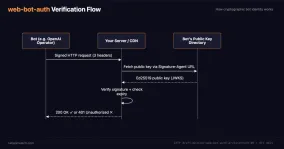
The cloud browser browses on behalf of a ChatGPT Work user. Its requests can be verified with Web Bot Auth signatures, instead of relying on a name in the User-Agent string. OpenAI: ChatGPT Work cloud browser allowlisting
How to identify a request from the cloud browser
Requests from the cloud browser carry the identification header below. It is an example of a request header, not code to add to your site:
Signature-Agent: "https://chatgpt.com"The request also carries Signature and Signature-Input. These are part of Web Bot Auth, a way to check a digital signature on the request. The value https://chatgpt.com on its own proves nothing about where the request came from. You can rely on verification done by your CDN, or implement the check against OpenAI’s public key using the instructions linked above. What is web-bot-auth? web-bot-auth is an emerging protocol at the IETF: bots cryptographically sign requests, sites verify the sender. Full definition of web-bot-auth
Infrastructure providers that support this verification can identify the requests without you checking each signature by hand. Verifying the identity does not override any other block you have set up.
What happens when you block the cloud browser
A block on the server or in a WAF can stop the cloud browser from reading pages and completing the user’s task on your site. It does not change the rules you set for the search and training bots.
How to restrict the cloud browser
Set the block in the system that filters requests to your site, based on the browser identity verified by its signature. If your infrastructure provider manages the filtering, you can ask it to block verified ChatGPT Work traffic to the whole site or to a specific path. A robots.txt group for GPTBot or ChatGPT-User does not replace this block.
How to read the requests in your logs
An access log is the record of the requests that reached your site. You can usually get it from your hosting provider or from your CDN, the service that sits between visitors and your server. If you have no access to the logs, ask support for the bot’s requests in the time range you want to check.
For each request, check:
- the bot name
- the source IP
- the path
- the time of the request
- the response code
For example, 403 can mean that the server or the WAF refused access, and 429 can mean rate limiting.
Version numbers in these strings change, so filter by the bot’s name rather than by a full header. After filtering, look at the actual URLs and responses instead of only counting requests.
In this log line, written for illustration, the request presents itself as GPTBot:
192.0.2.10 - - [20/Oct/2026:10:00:00 +0300] "GET /article/ HTTP/1.1" 200 18432 "-" "GPTBot/1.4"The source address is 192.0.2.10, the requested page is /article/, and 200 means the server returned a successful response. The User-Agent is shortened, and the IP is an example, not a verified address of the bot.
Bot requests and visits from ChatGPT
A crawl request in the log does not prove that the site was cited or that a person visited. People who click a link in ChatGPT show up in your analytics, not in the bots’ log lines. You can usually identify those visits in two ways: links often carry the utm_source=chatgpt.com parameter, and the browser may pass chatgpt.com as the referrer.
Neither one is guaranteed. In October 2026 some clicks from ChatGPT reached sites with no UTM parameter and no referrer, and analytics tools recorded them as direct traffic. In an Adobe analysis of about 500 pages, the drop in visits labeled as ChatGPT was similar in size to the rise in direct traffic. That points to an attribution problem: the visits most likely kept coming and were simply not labeled as coming from ChatGPT. Search Engine Land: ChatGPT appears to drop UTM tracking, making AI referral traffic harder to measure
So before you conclude that ChatGPT traffic fell, compare it with direct traffic to the same landing pages over the same days. Even when the parameter is there, it does not tell you which answer showed the link or how often the site was mentioned without a click.
Verifying the requests
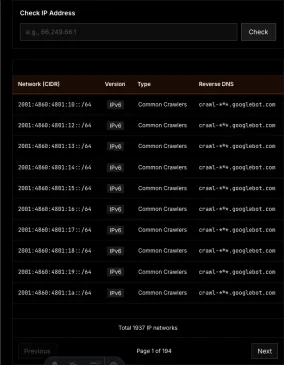
To verify a request, take the IP address it came from in your server or CDN log. OpenAI publishes a JSON file for each bot with the IP ranges it uses. These links lead to the current files. Check whether the request’s address falls inside one of the ranges in the matching list, rather than searching for an identical number:
If the site sits behind a CDN, use the client address as your CDN records it. The address of a proxy, or a header that the sender can write itself, is not a substitute for the real source address.
The ranges are written in CIDR notation, which describes a block of addresses. For example, the range 192.0.2.0/24 includes 192.0.2.10 even though that address is not listed on its own (an example for illustration only). If your hosting has no tool for matching an address against ranges, send support the source address from the log and the link to the official list, and ask them to check whether the address falls in one of the ranges. The check should use the provider’s current list.
robots.txt
A group for a specific bot does not inherit the restrictions of User-agent: *, under the standard’s group-matching rules. If a path has to stay blocked, the restriction has to appear in the group that applies to that bot as well. RFC Editor: RFC 9309: user-agent group matching in robots.txt
Blocking a path without blocking the whole site
To block only one folder, replace / with its path. In this example GPTBot is asked not to crawl members. It replaces the full-site example, rather than being added to it:
User-agent: GPTBot
Disallow: /members/
To restrict the same path for another bot that respects robots.txt, put its name in the User-agent line. If a group for that bot already exists, edit it and keep the other restrictions it still needs.
robots.txt is not an access-control mechanism. Private content needs server-side protection such as a login and permission checks. A Disallow rule does not technically stop a client that ignores it from requesting the page.
When you need a block on the server or in a WAF
A server-side block is necessary when you need to prevent access to content, or when the bot is not bound by crawling instructions. To avoid blocking users or other services by mistake, apply the rules to requests whose source you have verified, and check what the server actually returns.
Allow in robots.txt does not override a WAF block, a login requirement or a CAPTCHA. If the goal is to allow search or ad review, make sure the bot can reach the page and the resources it needs to read it.
Which restriction fits which goal
In my GEO work I treat collection for training and crawling for ChatGPT search as two separate decisions. If the goal is to limit training and stay available to search, block GPTBot and keep OAI-SearchBot allowed.
| Goal | Setting |
|---|---|
| Limit training and stay in search | Block GPTBot, keep OAI-SearchBot allowed |
| Leave ChatGPT search answers | Block OAI-SearchBot. Navigational links may still appear |
| Prevent fetches made for users | Control access for ChatGPT-User and for the cloud browser, each by its own identification |
| Allow ad review | Keep OAI-AdsBot and the landing pages reachable |
| Protect private content | Use login and permissions |
This guide is part of a series on the bots that matter for SEO and GEO work. Next, read the guide to Google’s bots and the Web Bot Auth guide.