Look at this chart. I’ll admit I find it beautiful.
It’s three months of Crawl Stats from a large client site of mine, and it’s the clearest picture I’ve seen of what controls how much Google crawls a big website: server response time, meaning how fast the server answers the bot on each request. Most teams are watching Core Web Vitals, Google’s page-experience metrics, instead. Later I’ll explain why I’d start with response time.
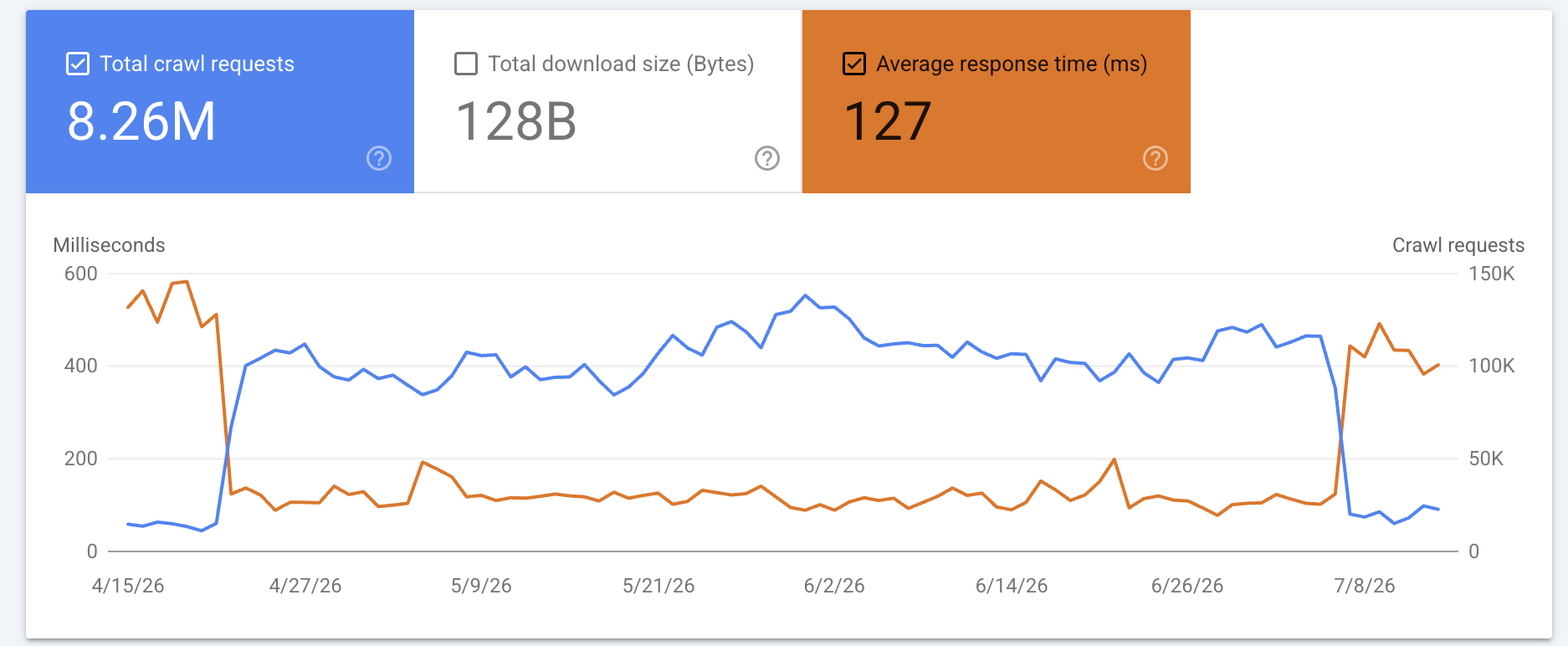
The two lines move in opposite directions, and that is the whole story.
- Orange: Average response time, in milliseconds.
- Blue: Googlebot’s daily crawl requests.
Watch the two crossovers. In April, response time drops from around 500ms to around 120ms, and crawl volume climbs from about 15,000 a day to about 100,000 a day, almost overnight. In July it runs in reverse. Response time climbs back toward 500ms, and crawl volume falls straight back to about 15,000 a day.
The server was never overwhelmed at any point: no 503s, no error spikes across the whole window. And it is hard to pin this on the demand side, because demand doesn’t jump sevenfold overnight and then fall back the exact moment the server slows down. When crawling mirrors response time this precisely, in both directions, the direction is clear: response time is the input. What is Crawl demand? Crawl demand is how much Google wants to crawl a site, separate from how much Google can crawl it. Full definition of Crawl demand
What is server response time?
The metric is called Average response time, and it lives in the Crawl Stats report in Search Console. It’s the average time Googlebot takes to fetch a resource from your site, measured from Google’s side, across everything it requests. It’s a fetch measurement rather than a render measurement: the renderer’s own requests show up as separate responses in the same report.
That last part matters, because this is easy to confuse with the TTFB (time to first byte) reported alongside Core Web Vitals. They are not the same number. Field TTFB is measured in real users’ browsers, on their networks, so it also carries slow connections, DNS, and connection setup. The Crawl Stats number is measured by a crawler sitting next to Google’s own infrastructure, with no browser, no rendering, and none of the consumer last-mile latency, DNS, or connection setup that field TTFB carries. Both reflect how fast your server responds, but they measure different things, and for crawling only the Crawl Stats number counts.
Crawl budget is really a time budget
Crawl budget, the amount of crawling Google allots your site, is really an amount of Googlebot’s time. And your response time is the exchange rate that turns that time into crawled URLs. What is Crawl budget? Crawl budget is the set of URLs Google can and wants to crawl on a site, set by crawl capacity and crawl demand. Full definition of Crawl budget
In numbers: say Google gives your site 60 minutes of Googlebot time a day. At 100ms a URL, about 36,000 fit into that hour. At half a second, about 7,200. At three seconds, about 1,200. Same hour, and response time alone moves the number about thirtyfold, end to end. The 60 minutes is just to make the math concrete. In reality the budget is set by many things, and response time is the part you control.
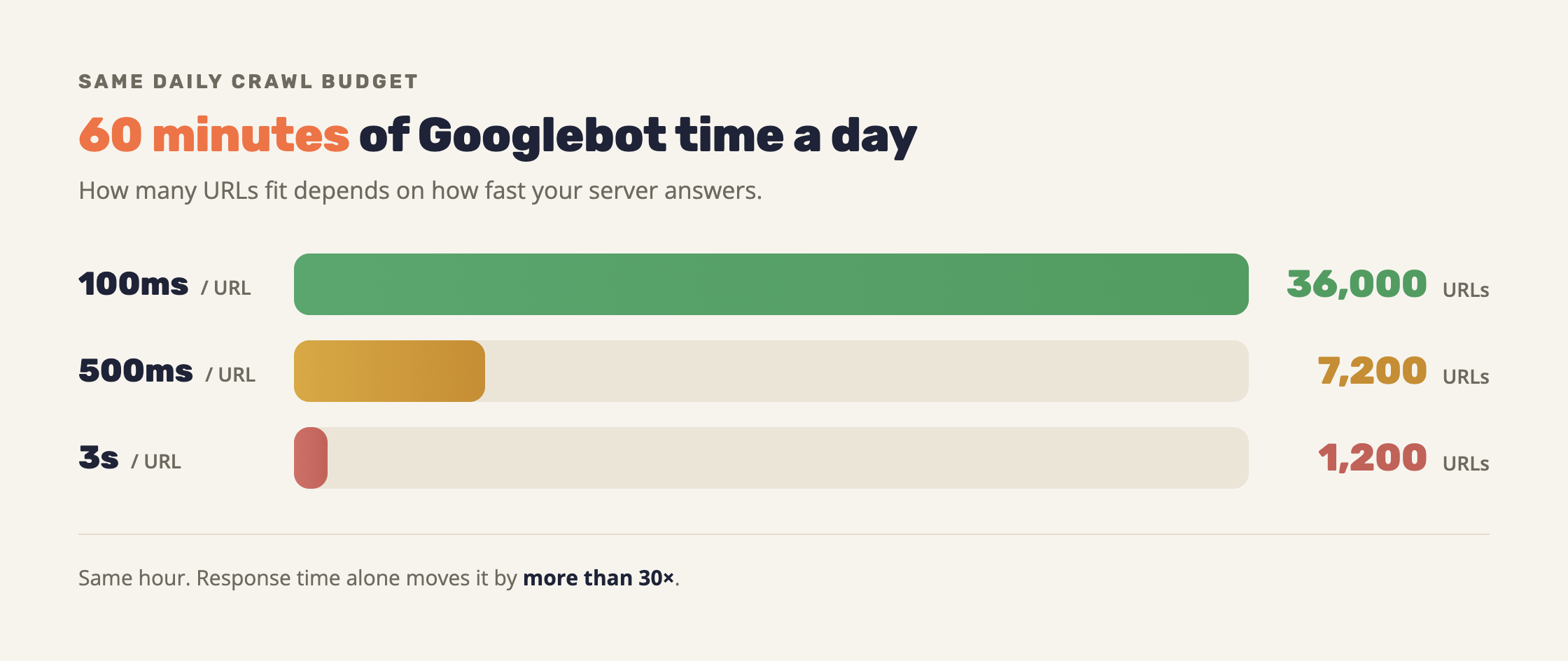
So what happened in the chart? By the exchange-rate math alone, dropping from 500ms to 120ms should give about four times more crawling. In practice it jumped about sevenfold, because the budget itself is not fixed. When your server answers fast over time, Google opens more parallel connections, and several connections working at once add up to more Googlebot time in the same day. A fast server wins twice: every second buys more pages, and there are effectively more seconds.
What Google says about response time and crawling
I had watched this play out on large client sites for years before I went looking for Google’s word on it. When I did, Google had said the same thing plainly.
The crawl budget documentation puts it directly: “If the site responds consistently and its response times (including latency and Time-to-First Byte) remain stable or improve, the limit goes up, meaning more connections can be used to crawl.” And the reverse: “If the site slows down (latency increases or response times become longer), or responds with server errors (5xx HTTP status codes) or rate-limiting signals (such as HTTP 429), the limit goes down and Google crawls less.” Google: Crawl Budget Management
Google revised that page in July 2026, and it now also defines what it is counting. Crawl capacity, or hostload, is a cap on “the total amount of time your server spends holding connections open for Google, factoring in both the number of parallel connections and their duration.” What is Crawl capacity? Crawl capacity is Google's ceiling on the total time a server holds connections open for it. Full definition of Crawl capacity
So the ceiling is denominated in server time rather than in URLs, and it counts parallel connections explicitly. That is the same mechanism behind the sevenfold jump in the chart, in Google’s own words.
A 2026 post on how Googlebot works is even blunter: “if your server is struggling to serve bytes, our crawlers will automatically back off to avoid overloading your infrastructure, which will drop your crawl frequency.” Google: Inside Googlebot: demystifying crawling, fetching, and the bytes we process
And in 2024, Google retired the manual Crawl Rate Limiter from Search Console, because Googlebot now adjusts its crawl rate automatically based on how your server responds. The manual control was slower and did the job worse. Google: Upcoming deprecation of Crawl Rate Limiter Tool in Search Console
The ceiling your response time buys is shared with Google’s other crawlers
Every Google crawler has its own demand, but the ceiling is shared. Google’s documentation says so explicitly: crawl capacity is split across all crawlers, and “high demand from one crawler can reduce the capacity available for others.”
In practice, Googlebot is not alone on your server. AdsBot, StoreBot, and the rest of Google’s crawlers all draw down the same ceiling. Per Google’s docs, AdsBot’s demand rises when a site is running a lot of Dynamic Search Ads targets, and it revisits them roughly every two weeks.
Both halves of that are documented, and together they mean a site with many DSA targets will see AdsBot take a share of capacity while organic crawling shrinks, without anything changing in the content or on the server.
Crawl demand: when Google chooses to crawl less
A crawl slowdown is not always about server speed. Sometimes Google simply wants to crawl less.
The chart above is the exact opposite of the low-demand scenario: there, demand ran ahead of what Google was managing to crawl, so the moment the ceiling lifted, crawling jumped.
If Google decides your content isn’t worth much, or that it’s stale, it can crawl less no matter how fast you answer. So don’t read every dip as a response-time problem. Look at your own Crawl Stats. If your response time is flat and low and crawling still falls, that is a demand story, and it is a different article.
Why I’d look at this before Core Web Vitals
Response time sits underneath Core Web Vitals rather than next to it. It feeds LCP, the time until the page’s main content shows, so a faster response lifts your Core Web Vitals too. The same response time also sets your crawl capacity and shows up in what real users feel when a page loads. Improve it and all of that moves at once.
Google’s crawl-budget documentation names Time-to-First Byte among the response times it watches, which is not confirmation that Core Web Vitals drive crawling. The TTFB Google means is the one its own crawler measures, the same number sitting in your Crawl Stats report. Field TTFB, measured in real users’ browsers, isn’t part of this equation.
There is another reason I like pointing engineering teams at this number. Most SEO findings are soft. “Our relevance isn’t great” is not something a backend engineer can act on. “Your server takes three seconds to answer Googlebot, and here are the numbers” is. Hand that to whoever runs the server and they have something concrete to work on.
Why this gets worse as the site grows
The stakes grow with the site. On a small site a slow response barely dents anything. Across millions of URLs it gets multiplied by every one of them, and it becomes the difference between Google getting through your whole site and never finishing.
This is also the first place I’d look for one specific, common symptom. You run a large site, you publish new pages, and they take too long to get discovered and indexed. Before you touch internal linking or rebuild your sitemaps, check what your server is doing to Googlebot. A slow response caps how much it can crawl, and new URLs are usually the first thing to starve.
What to do
Open Crawl Stats in Search Console and read the Average response time line first.
Google doesn’t publish a target, but here is mine. I want to see under 300ms, ideally under 200ms. Anything over 600ms is bad in my book. Take it as a practitioner’s rule of thumb, not a law.
The usual suspects on a large site, all of them engineering territory:
- A low cache hit ratio, so dynamic pages hit the origin on every request.
- Expensive database queries, especially on filter and facet pages with endless combinations.
- No CDN, or a CDN that isn’t caching HTML.
- An origin that is under-provisioned and slows down under crawl load.
- Slow backend or third-party calls blocking the response.
- Server-side rendering with nothing cached in front of it. What is Server-side rendering? Server-side rendering (SSR) is the approach where the server sends a page's HTML ready, instead of the browser building it in JavaScript. Full definition of Server-side rendering
In my experience it is almost always one of the first two on that list, a cache that isn’t doing its job or a query that got expensive as the site grew. The fancier causes are real but rare.
How to find where the slowness comes from
Break the Crawl Stats report down by response code and by file type, and if you have server logs, look at the slow percentiles of response time, p75 and p95, by URL pattern.
The report also breaks requests down by Googlebot type, which is where you can see who else is working your server. AdsBot and StoreBot get their own rows, and everything else, GoogleOther included, lands under Other agent type. So this breakdown will surface an AdsBot squeeze but will not separate GoogleOther from the rest.
And look past the pages your visitors see. Average response time covers everything Googlebot fetches: HTML, JavaScript, CSS, images, fonts, and the API or XHR calls the renderer makes. A slow endpoint that no human ever loads directly can still be dragging the number down, because Googlebot is fetching it too.
And waste counts too. Part of controlling the budget is making sure Googlebot isn’t fetching resources the page doesn’t need for rendering, like leftover scripts or parameter-duplicated URLs. Every such fetch burns Googlebot time on something that doesn’t move you forward.
There is also the reverse case: pages get crawled again even though their content hasn’t changed. A 304 (Not Modified) response tells Googlebot to reuse the copy it already has instead of downloading the whole HTML again. On a large site that hands Googlebot time back to the pages that do need it.
And to set expectations before you go: crawling is not a ranking signal, and more crawling won’t lift your positions on its own. What it does give a large site: Google discovers new pages faster and keeps fresher versions of them in the index.