Open the logs of a large site and you will find a lot more than one Googlebot. There is GoogleOther, there is Google-InspectionTool, and more recently Google-Agent and Google-GeminiNotebook.
Some of those names feed Search, some feed Gemini, and some feed nothing at all and just serve testing tools.
I went through the logs of several large sites to see which of these names actually show up. Some arrive daily. Some I have never seen. And two of the tokens in the documentation have no user agent at all, so they will never appear in a log.
OpenAI and Anthropic run their own crawlers on a similar pattern. Google’s list is longer, and the split between its bots is less intuitive.
Google’s three crawler categories
Each category behaves differently towards robots.txt, and that is the practical difference between them. What is robots.txt? robots.txt is a text file that says which URLs crawlers may fetch. robots.txt controls crawling, not indexing. Full definition of robots.txt
Common crawlers
The regular crawlers. The documentation says they always obey robots.txt when crawling automatically. This is where Googlebot and all its variants sit, along with GoogleOther and Google-CloudVertexBot.
Special-case crawlers
Crawlers tied to specific products, mainly advertising. They may ignore robots.txt, and they come from separate IP ranges.
User-triggered fetchers
Requests a user initiated. The documentation says these generally ignore robots.txt, precisely because the user asked for them.
Google’s bots that feed Search, including AI Overviews
A token is the name you write in the User-agent line of robots.txt to address a specific bot. It is not the same as the full user agent string that shows up in your logs, which is much longer, and some tokens have no string of their own at all.
| Token | What it feeds |
|---|---|
Googlebot | Search, including Discover and every Search feature |
Googlebot-Image | Images, Discover, and anywhere images, logos and favicons appear |
Googlebot-Video | Video features in Search |
Googlebot-News | Google News and the News app |
Storebot-Google | Google Shopping across all its surfaces |
Googlebot’s user agent, mobile and desktop:
Mozilla/5.0 (Linux; Android 6.0.1; Nexus 5X Build/MMB29P) AppleWebKit/537.36 (KHTML, like Gecko) Chrome/W.X.Y.Z Mobile Safari/537.36 (compatible; Googlebot/2.1; +http://www.google.com/bot.html)Mozilla/5.0 AppleWebKit/537.36 (KHTML, like Gecko; compatible; Googlebot/2.1; +http://www.google.com/bot.html) Chrome/W.X.Y.Z Safari/537.36Googlebot-Image and Googlebot-Video arrive with short strings of their own, Googlebot-Image/1.0 and Googlebot-Video/1.0.
Googlebot-News is a control token only. It has no user agent of its own, and crawling happens with the regular Googlebot strings.
The same category includes Google-InspectionTool, used by live URL Inspection in Search Console and the Rich Results Test. Blocking it in robots.txt prevents those tools from accessing the blocked pages. Googlebot can still crawl them for Search, as long as the rules that apply to it allow access.
AI Overviews and AI Mode are fed by Googlebot. They have no separate token. Google writes that AI is built into Search and integral to how Search functions, and that robots.txt directives for Googlebot are therefore the control over how a site is crawled for Search.
Inclusion in AI features has a separate control in Search Console, under Settings then Search generative AI. It has been available to all sites worldwide since August 31, 2026. It lets you exclude your site’s content and links from AI Overviews, AI Mode and generative AI features in Discover. The choice does not affect inclusion or ranking elsewhere in Search, and it does not control model training. Google: Search generative AI control
Google’s AI-related tokens: Google-Extended is not a crawler
Google-Extended
Google-Extended is not a crawler.
Google-Extended has no user agent of its own. Crawling uses Google’s regular user agents, while the token controls which uses of the content are permitted. You will not see a separate request named Google-Extended in your logs.
Per the definition, it covers two things: training of future generations of Gemini models that power Gemini Apps and the Vertex AI API, and grounding, meaning feeding content from the Search index to the model at prompt time, in Gemini Apps and in Grounding with Google Search on Vertex AI.
The documentation goes on to say that Google-Extended does not affect a site’s inclusion in Search and is not used as a ranking signal.
What that means in practice: blocking Google-Extended does not remove you from AI Overviews or AI Mode. On a separate page Google writes that AI is built into Search, that robots.txt for Googlebot is the control over it, and points Google-Extended at its other systems.
GoogleOther
GoogleOther is a generic crawler. The documentation defines it as not tied to any specific product, and says various Google teams may use it to fetch publicly accessible content, for example one-off crawls for internal research and development.
Its user agent:
Mozilla/5.0 AppleWebKit/537.36 (KHTML, like Gecko; compatible; GoogleOther) Chrome/W.X.Y.Z Safari/537.36It has two variants, GoogleOther-Image and GoogleOther-Video, arriving as GoogleOther-Image/1.0 and GoogleOther-Video/1.0, both of which also honour the GoogleOther token.
GoogleOther obeys robots.txt. To stop it from crawling your site, add a group with User-agent: GoogleOther and Disallow: /. This blocks its crawls without blocking Googlebot’s Search crawling.
Google-CloudVertexBot
Google-CloudVertexBot is a real crawler, with a user agent, that shows up in logs. The documentation defines it as serving crawls that site owners themselves requested for building Vertex AI Agents, and says it has no effect on Search.
The documentation does not publish a full string for it, only the substring Google-CloudVertexBot inside the user agent, which is what to search for in logs.
If robots.txt has no specific group for Google-CloudVertexBot, it follows the rules for Googlebot. If it has its own group, that group determines what it can crawl. Blocking Googlebot therefore does not necessarily block Google-CloudVertexBot.
User-triggered: Google-Agent and Google-GeminiNotebook
Google-Agent
Google-Agent is the agent that browses sites and performs actions on a user’s request. It runs on Google infrastructure, has its own IP list, user-triggered-agents.json, and its reverse DNS is google-proxy-***.google.com.
Its desktop user agent:
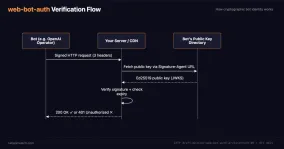
Mozilla/5.0 (X11; Linux x86_64) AppleWebKit/537.36 (KHTML, like Gecko; compatible; Google-Agent; +https://developers.google.com/crawling/docs/crawlers-fetchers/google-agent) Chrome/W.X.Y.Z Safari/537.36Google is trialling the web-bot-auth protocol on it using the agent.bot.goog identity, signing a subset of requests cryptographically. The signature lets you confirm a request genuinely came from Google, and it is still experimental. What is web-bot-auth? web-bot-auth is an emerging protocol at the IETF: bots cryptographically sign requests, sites verify the sender. Full definition of web-bot-auth
Google-GeminiNotebook
Google-GeminiNotebook fetches URLs that Gemini Notebook users added as sources for their projects. To verify requests, check their IP addresses against Google’s published user-triggered fetcher ranges. The user agent string alone is not enough.
Its desktop user agent:
Mozilla/5.0 (X11; Linux x86_64) AppleWebKit/537.36 (KHTML, like Gecko) Chrome/137.0.0.0 Safari/537.36 (compatible; Google-GeminiNotebook; +https://developers.google.com/crawling/docs/crawlers-fetchers/google-gemininotebook)In July 2026, Google-NotebookLM became Google-GeminiNotebook. Documented support for the old name ended in August 2026. Update firewall rules and log filters that still depend on it.
Fetching feeds, reading pages aloud and verifying sites
The same category holds FeedFetcher-Google for RSS and WebSub feeds, Google-Read-Aloud for reading pages aloud, Google-Site-Verification for Search Console verification, GoogleMessages for link previews in chat, Google-Pinpoint for personal document collections in Pinpoint, and Google-CWS for the Chrome Web Store.
Google’s ad crawlers, and Google-Safety
AdsBot-Google and AdsBot-Google-Mobile check the quality of pages that ads point to. Mediapartners-Google crawls sites participating in Google’s advertising products. Its crawl preferences affect AdSense and Ad Manager, among others. APIs-Google handles push notification delivery. Google: Google Special-Case Crawlers
All four share one behaviour: the documentation says they obey their own token, but that the global wildcard token is not taken into account. A User-agent: * with Disallow: / does not touch them. They need an explicit group in their own name.
Google-Safety, which handles abuse crawling such as malware discovery, ignores robots.txt entirely.
robots.txt: what each token blocks
You can control each token separately:
User-agent: Google-Extended
Disallow: /

User-agent: GoogleOther
Disallow: /
This is what each block does:
| Block this | Here is what happens |
|---|---|
Googlebot | Prevents crawling of the blocked paths. A URL may still appear in results without a snippet. To remove a page with noindex, allow Google to crawl that directive; use the separate Search Console control to exclude the site from Search AI features |
Google-Extended | Restricts the content uses covered by the token: future Gemini training and grounding in the documented Gemini and Vertex products. It does not remove the site from Search and is not a ranking signal |
GoogleOther | Prevents this crawler’s generic crawls of the blocked paths |
Google-CloudVertexBot | Restricts this crawler’s site-owner-requested crawls for Vertex AI Agents |
Google-InspectionTool | Restricts access by live URL Inspection and the Rich Results Test. It does not change Googlebot’s regular crawling |
As for the user-triggered category, meaning Google-Agent and Google-GeminiNotebook, the documentation says it generally ignores robots.txt and does not present these tokens as blocking controls. What is user-triggered fetcher? A user-triggered fetcher is a bot that fetches a page because a user asked, not as part of proactive crawling. Full definition of user-triggered fetcher
For Google’s crawlers that follow robots.txt rules, the most specific matching group determines which rules apply. A specific group and User-agent: * do not merge. If multiple groups are equally specific, their rules are combined. Google: How Google Interprets the robots.txt Specification
How to spot Google’s bots in your logs
It is worth searching for the token names themselves. Version numbers change, so searching by name alone works better:
Googlebot
GoogleOther
Google-InspectionTool
Google-CloudVertexBot
Google-Agent
Google-GeminiNotebookGoogle-InspectionTool serves live URL Inspection in Search Console and the Rich Results Test. Its requests can come from an on-demand test rather than Google’s regular Search crawl.
How to verify a Google bot against its IP ranges
A user agent is a text string. Anyone can send a request with Googlebot written in it.
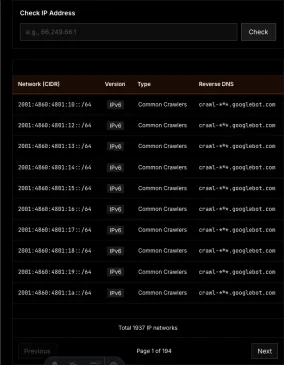
Google publishes five JSON files with IP ranges for its crawlers, fetchers and agents. To verify a request, check whether its IP address falls within the matching category’s CIDR ranges. My Googlebot IP address article has a list that updates daily, with examples for using the ranges in iptables and Nginx.
You can also verify through DNS: run a reverse lookup on the IP address, check that the hostname belongs to the domain appropriate to that category, then run a forward lookup on that hostname and confirm it returns the original IP. Checking the suffix alone is not enough. Google: Verify Requests from Google Crawlers and Fetchers